Optimizing UI/UX for Tactical RPGs: Radial vs. Traditional Menus


Key Takeaways
- •The Core UI/UX Challenge in Tactical RPGs
- •Understanding Radial Menus: Pros and Cons
- •Advantages of Radial Menus
As game developers, we constantly strive to create intuitive and engaging player experiences. In the realm of tactical RPGs, where decision-making is paramount and often involves a multitude of abilities and actions, the user interface (UI) and user experience (UX) design become critical. A recent discussion around Star Wars Zero Company's radial ability menu and the preference for a more traditional XCOM-style experience highlights a key design dilemma: how do we cater to diverse player preferences while maintaining a cohesive and efficient interface?
This guide delves into the considerations for designing ability menus in tactical RPGs, examining the strengths and weaknesses of radial versus traditional list-based approaches, and offering insights into implementing flexible UI options that empower players.
The Core UI/UX Challenge in Tactical RPGs
Tactical RPGs, by their nature, demand precise command input. Players need to quickly access a wide array of character abilities, items, and movement options to execute complex strategies. The UI must not only present this information clearly but also facilitate rapid decision-making under pressure. When a game like Star Wars Zero Company offers a radial menu by default, but a significant portion of its player base seeks a traditional XCOM-style alternative, it signals a fundamental difference in how players interact with their game systems.
The underlying challenge for developers is balancing aesthetic innovation with established player expectations and muscle memory. Radial menus, while visually appealing and often optimized for controller input, can sometimes introduce friction for players accustomed to keyboard and mouse or those who prefer a more explicit, list-based presentation of options.
Understanding Radial Menus: Pros and Cons
Radial menus, also known as pie menus, present options in a circular layout around a central point, often the player's cursor or character. They are frequently lauded for their efficiency in certain contexts.
Advantages of Radial Menus
- Speed and Efficiency: Once muscle memory is developed, selecting options in a radial menu can be incredibly fast. Players move their input device (mouse, analog stick) in a direction rather than traversing a linear list, which can feel more fluid.
- Ergonomics for Controllers: Radial menus are often highly optimized for game controllers, where flicking an analog stick in a direction feels natural and intuitive, reducing the need for multiple button presses or d-pad navigation.
- Visual Clarity for Limited Options: For a small number of distinct options (e.g., 4-8), a radial menu can present all choices simultaneously without scrolling, making them immediately visible and selectable.
- Immersive Feel: By keeping the player's focus on the central character or action, radial menus can contribute to a more immersive experience, reducing screen clutter from traditional UI elements.
Disadvantages of Radial Menus
- Learning Curve: The initial learning curve can be steep. Players unfamiliar with radial menus may struggle with accuracy and speed until they develop the necessary muscle memory.
- Scalability Issues: Radial menus become cumbersome with a large number of options. If you have more than 8-12 abilities, options either become too small, require sub-menus (defeating the speed advantage), or necessitate multiple radial layers, which adds complexity.
- Precision for Mouse Users: While quick, achieving precise selection with a mouse in a radial menu can sometimes feel less direct than a click on a distinct button in a list.
- Information Density: Radial menus are inherently less information-dense than traditional lists. They typically show only an icon or a very short name, making it harder to display tooltips, cooldowns, or detailed descriptions without additional pop-ups.
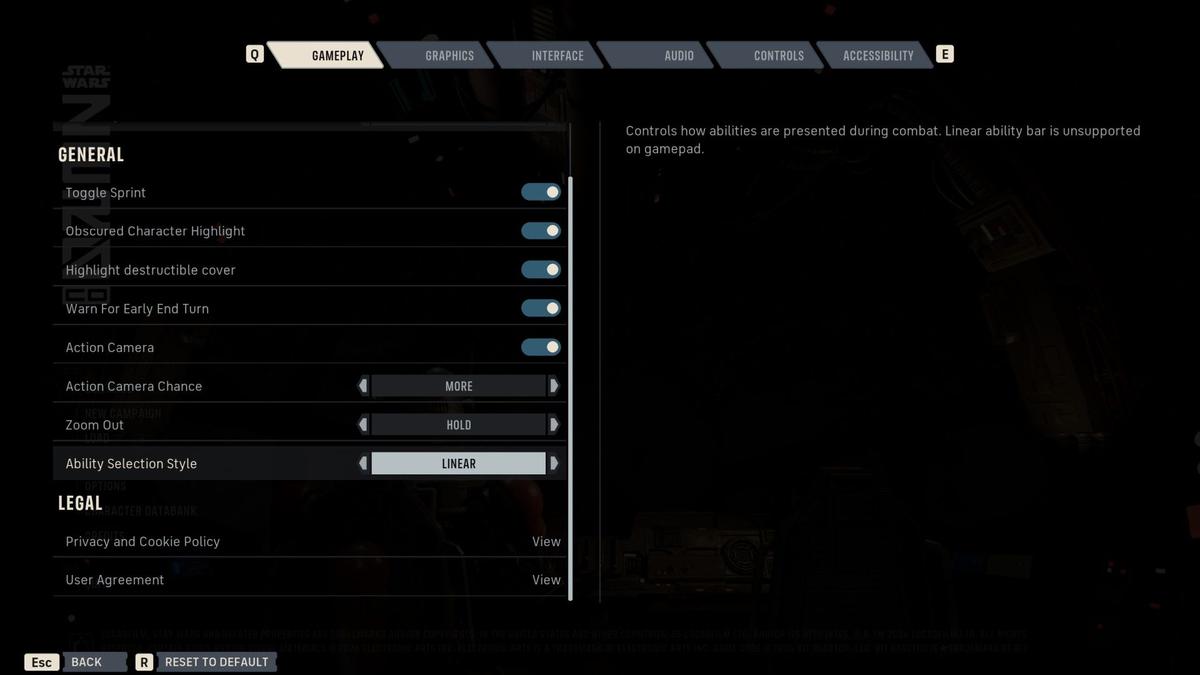
Traditional List-Based Menus: The XCOM Paradigm
The "XCOM-style experience" typically refers to a more traditional, often rectangular or linear, menu system where abilities and actions are presented as a list of buttons or icons. These are familiar to many PC gamers and offer a different set of design strengths.
Advantages of Traditional Menus
- Familiarity and Low Learning Curve: Most players are accustomed to list-based menus. The interaction model is straightforward: click an option to select it.
- Information Richness: Traditional menus excel at displaying a wealth of information. Each button can easily include an icon, name, cost, cooldown, range, and even a brief description, often with tooltips on hover.
- Scalability: Lists can easily accommodate a large number of options through scrolling, tabs, or categorization. This makes them highly adaptable for characters with extensive ability sets.
- Precision for Mouse Users: Clicking a distinct, often larger, button in a list is highly precise and forgiving for mouse input.
- Keyboard Navigation: Traditional menus often lend themselves well to keyboard shortcuts (e.g., 1-9 for abilities), allowing power users to bypass mouse interaction entirely.
Disadvantages of Traditional Menus
- Screen Clutter: With many options, traditional menus can take up significant screen real estate, potentially obscuring the battlefield or character models.
- Slower for Controllers: Navigating a long list with a controller's analog stick or D-pad can be slower and feel less direct than a radial menu's directional flick.
- Less Dynamic: Visually, traditional menus can sometimes feel static compared to the dynamic, expanding nature of a radial menu.
Player Preference and the Developer's Dilemma
The feedback on Star Wars Zero Company's radial menu highlights a crucial point: player preference is diverse. What one player finds intuitive and efficient, another might find clunky or unintuitive. As developers, our goal isn't just to implement a system but to implement the right system for our target audience, or ideally, systems that cater to a broader audience.
Here's a simplified view of player preference influencing UI design:
The challenge for developers lies in recognizing these divergent preferences and designing UI systems that are flexible enough to accommodate them.
Designing for Flexibility: Offering UI Customization
The ideal solution, as implied by the Star Wars Zero Company discussion, is to provide players with choices. Offering an alternative UI mode isn't just a quality-of-life feature; it's a critical design decision that can significantly broaden a game's appeal and accessibility.
Key Steps to Implement Flexible UI for Abilities
1. Identify Core Interaction Paradigms:
- Radial: Best for quick, directional input, especially with controllers, and a limited set of frequently used abilities.
- Traditional List: Best for precise, information-rich selection, especially with mouse/keyboard, and managing a large number of abilities.
2. Modular UI Architecture:
- Design your UI components (ability icons, tooltips, selection logic) in a modular way. This allows you to "plug and play" different presentation layers (radial vs. list) without re-writing core functionality.
- Separate the data (what an ability does, its cooldown, cost) from its visual representation.
3. Player Options Menu:
- Dedicate a clear section in the game's options menu for "UI Style" or "Ability Menu Layout."
- Provide descriptive labels and perhaps small visual previews of what each option looks like.
- Consider options for customizing individual aspects, such as button size, icon scaling, or tooltip delay.
4. Input Method Detection and Defaulting:
- Automatically detect the primary input method (controller vs. keyboard/mouse) at game launch.
- Default to the UI style most appropriate for that input method, but always allow the player to override it. This provides a good out-of-the-box experience while retaining flexibility.
5. Contextual UI Adaptation:
- Beyond a global setting, consider if certain game states benefit from a specific UI type. For instance, a radial menu for quick movement options during exploration, but a traditional list for detailed character sheet management.
- This might involve dynamically switching UI elements based on player actions or game mode.
6. User Testing and Feedback:
- Early and continuous user testing is crucial. Observe how different players interact with both UI styles.
- Gather feedback on ease of use, speed, and overall satisfaction. This iterative process helps refine both UI options.
Case Study: Star Wars Zero Company and the XCOM Preference
While the specifics of Star Wars Zero Company's implementation aren't fully detailed in the snippet, the player sentiment highlights that even a well-designed radial menu can be suboptimal for a segment of the audience. The "XCOM-style experience" isn't just about a specific visual layout; it's about a particular interaction paradigm that veteran tactical RPG players have internalized.
The lesson here for developers is that when entering a genre with strong existing conventions, deviating from those conventions without offering alternatives can alienate players. Innovation is valuable, but accessibility through choice is often more so.
Conclusion
The debate between radial and traditional menus in tactical RPGs like Star Wars Zero Company is a microcosm of broader UI/UX design challenges. There's no single "best" solution; rather, there are optimal solutions for different player types, input methods, and game contexts. By understanding the inherent strengths and weaknesses of each approach and, critically, by designing with flexibility in mind, developers can create more inclusive and satisfying experiences. Offering players the choice to tailor their interface to their preferred playstyle isn't just a feature – it's a commitment to player agency and a hallmark of thoughtful game design. Embracing this philosophy ensures your game is not only innovative but also accessible and enjoyable for the widest possible audience.
At White Cube Studios, we translate technical architecture into shipping systems across our specialized development pillars: