Designing Superior Third-Person Cameras: Lessons from BG3 Mod

Key Takeaways
- •Designing Superior Third-Person Cameras: Lessons from the Baldur's Gate 3 Mod
- •The Intrinsic Challenge of Third-Person Camera Design in RPGs
- •Core Principles of a Superior Over-the-Shoulder Camera
Designing Superior Third-Person Cameras: Lessons from the Baldur's Gate 3 Mod
As game developers, we understand that the camera is not merely a viewport; it's a critical component of player immersion, strategic understanding, and overall game feel. A poorly implemented camera can quickly break the spell of even the most compelling narrative or finely tuned combat system. This is particularly true in complex RPGs like Baldur's Gate 3, where players navigate intricate environments, engage in tactical turn-based combat, and experience deeply personal storytelling.
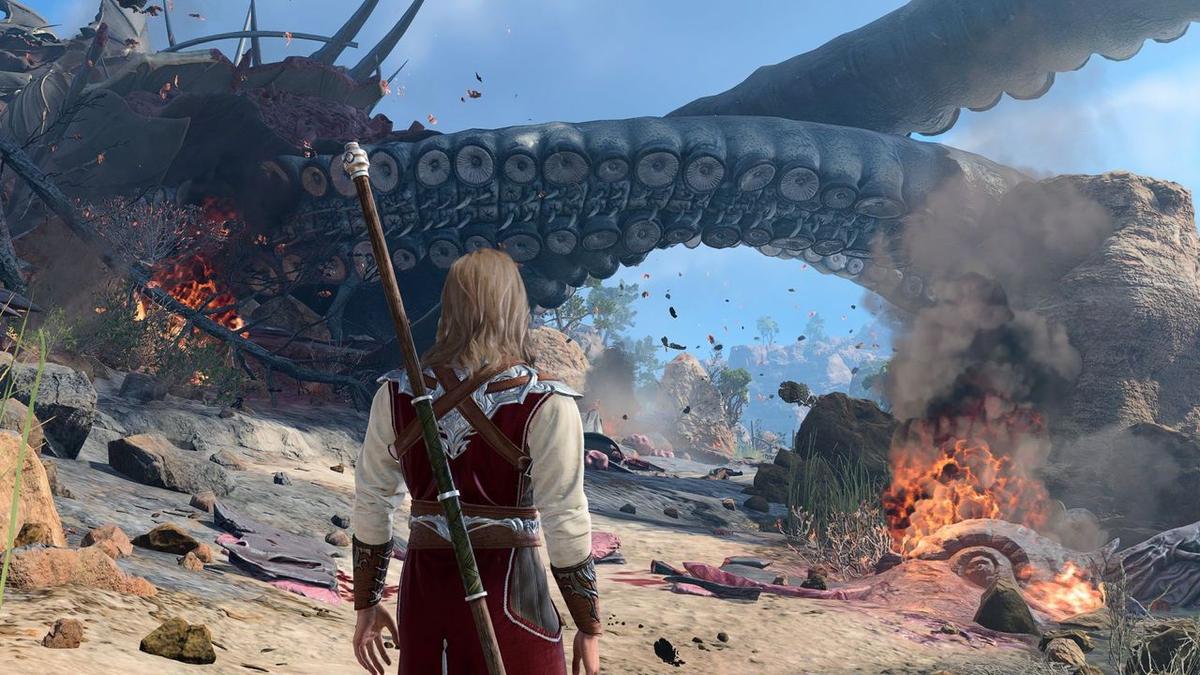
The recent over-the-shoulder camera mod for Baldur's Gate 3 has sparked significant discussion precisely because its creator went to "great lengths to demonstrate it's not like other third-person viewpoint solutions." This statement alone highlights a fundamental challenge in camera design: moving beyond generic solutions to create something truly responsive and immersive. This guide will break down the principles behind crafting a superior third-person camera, drawing inspiration from the insights offered by such an innovative mod in a game like Baldur's Gate 3.
The Intrinsic Challenge of Third-Person Camera Design in RPGs
Traditional CRPGs often employ an isometric or top-down perspective, offering a broad tactical overview. While effective for strategic combat and environmental awareness, this perspective can sometimes distance players from the immediate action and their character's personal journey. The shift to a more intimate third-person, over-the-shoulder view in an RPG like Baldur's Gate 3 presents a unique set of design hurdles that demand sophisticated solutions.
One of the primary difficulties lies in balancing player visibility with environmental complexity. In a world rich with verticality, intricate architecture, and dynamic encounters, a static or poorly responsive camera can lead to frustrating obstructions, obscured enemies, or a constant battle against the camera itself. Generic third-person solutions often fail to adapt to these nuances, leading to moments where the camera clips through walls, gets stuck behind objects, or simply provides an unhelpful perspective, pulling the player out of the experience. The mod's emphasis on not being like other solutions underscores the need for intelligent, context-aware camera systems that prioritize player experience above all else.
Core Principles of a Superior Over-the-Shoulder Camera
The success of an over-the-shoulder camera, especially in an environment as rich as Baldur's Gate 3, hinges on several core design principles that elevate it beyond mere technical implementation. These principles focus on immersion, clarity, and responsiveness.
- Dynamic Contextual Awareness: A truly superior camera doesn't just follow the player; it understands the player's situation. Is the player in combat, exploring a dense dungeon, or engaging in dialogue? The camera should intelligently adjust its distance, angle, and field of view to best suit the current context, providing tactical information during combat and cinematic intimacy during cutscenes or exploration.
- Intelligent Obstruction Handling: One of the most common frustrations with third-person cameras is object occlusion. A superior system actively anticipates and mitigates this. Instead of merely clipping through geometry, it should smoothly shift, zoom, or even temporarily fade occluding objects to maintain a clear view of the player character and relevant action.
- Player-Centric Focus with Environmental Awareness: While the camera is over the shoulder, it must still provide enough environmental information for navigation and strategic decision-making. This involves striking a delicate balance between keeping the player character prominent and showing crucial elements of the surroundings, such as nearby enemies, interactive objects, or critical path markers.
- Seamless Transitions and Smooth Movement: Jumpy or abrupt camera movements are jarring. A superior camera prioritizes smooth interpolation between states and positions, making adjustments feel natural and unobtrusive. This contributes significantly to the overall polish and immersive quality of the game.
Technical Implementation: Crafting Dynamic Viewpoints
Implementing these principles requires a robust camera system that goes beyond simple parent-child relationships or fixed offsets. It often involves a blend of physics-based collision detection, state machines, and intelligent interpolation.
Dynamic Camera Positioning
The foundation of a superior camera is its ability to dynamically adjust its position and orientation based on a multitude of factors. This isn't just about following the player; it's about leading the player's eye and providing the most relevant information.
- Targeting and Offsets: While the player character is the primary target, the camera's actual look-at point might be slightly above their head or offset to one side to create the "over-the-shoulder" effect. These offsets should be adjustable based on character height, equipped weapons, or even character stance (e.g., crouching).
- Distance and Angle Variation: Instead of a fixed distance, the camera should have a range of distances and angles it can adopt. During exploration, it might pull back slightly to show more of the environment. In tight corridors or intense combat, it might move closer for a more focused, intense view. These changes need to be subtle and driven by game state.
- Soft Collision and Spring Arms: To prevent clipping through geometry, a "spring arm" or similar mechanism is crucial. This involves casting rays or spheres from the camera's intended position to its target. If an obstruction is detected, the camera retracts along the spring arm until it clears the object, providing a smooth, non-clipping experience. This is often combined with a "push back" logic that subtly nudges the camera away from obstacles.
Contextual Awareness and Obstruction Handling
The intelligence of the camera truly shines in its ability to react to the game world.
- State-Based Camera Logic: Employ a state machine to define different camera behaviors.
- Exploration State: Wider FOV, slightly pulled back, prioritizing environmental visibility.
- Combat State: Closer, more focused on the player and immediate enemies, potentially with a slight upward tilt to see incoming threats.
- Dialogue State: Cinematic, often fixed or slowly panning to frame characters during conversations.
- Cover State: Adjusts to peek over or around cover, maintaining line of sight for the player.
- Occlusion Management: When objects obstruct the view to the player character, the camera system needs to react.
- Dynamic Transparency: Temporarily fading out occluding objects (e.g., trees, pillars) is a common technique. This requires careful material setup and rendering passes.
- Camera Repositioning: As mentioned with spring arms, the camera can move to a new, unobstructed position. This should prioritize minimal disruption to the player's perspective.
- Camera Snap/Pivot: In extreme cases, the camera might quickly snap to the other shoulder or pivot around the player if an obstruction is unavoidable from the current side. This should be a last resort to avoid jarring movements.
Here's a simplified flowchart illustrating dynamic camera adjustment logic:
Player Control and Immersion
While the camera should be intelligent, providing a degree of player control is essential for agency and comfort.
- Manual Adjustment: Allowing players to manually rotate the camera (e.g., with the mouse or right stick) is standard. The system should then smoothly blend back to its intelligent tracking once the player releases control.
- Shoulder Swap: A quick keybind to switch the over-the-shoulder view from left to right (or vice versa) can be invaluable for clearing line of sight in certain situations or catering to player preference.
- FOV Options: Providing options to adjust the Field of View empowers players to fine-tune their visual experience, impacting how much of the environment they see.
Integrating User Feedback and Iteration
The Baldur's Gate 3 mod's existence and its "great lengths to demonstrate" its unique qualities underscore the importance of player feedback. Modders often fill gaps or enhance experiences that even professional development teams might overlook. For developers, this means:
- Proactive Testing: Extensive playtesting in diverse environments and scenarios is crucial to identify camera pain points.
- Telemetry and Analytics: Tracking where players struggle with visibility or camera control can provide data-driven insights.
- Community Engagement: Listening to community discussions, especially around popular mods, can highlight areas for improvement or innovative solutions players are seeking. The very fact that a mod like this gains traction indicates a strong player desire for a more refined third-person experience in BG3.
Conclusion
A superior third-person camera system is a hallmark of polished game design, transforming a functional viewpoint into an active participant in the player's experience. By embracing dynamic contextual awareness, intelligent obstruction handling, and player-centric design, developers can move beyond generic solutions. The Baldur's Gate 3 over-the-shoulder camera mod serves as a powerful reminder that even in highly acclaimed games, there's always room for innovation in core mechanics like camera control, demonstrating how thoughtful design can significantly enhance immersion and player satisfaction. Investing in these sophisticated camera behaviors is not just about avoiding frustration; it's about deepening the player's connection to the game world and their character's journey.
At White Cube Studios, our media production practice directs high-retention video and studio photography across our creative pillars: