How to Recreate 90s CRT Motion Clarity on OLED Monitors

Key Takeaways
- •The Physics of Motion Blur: Sample-and-Hold vs Impulse Displays
- •Why High-Refresh OLED Hardware Makes CRT Motion Feasible
- •Step-by-Step: Configuring High-Refresh OLEDs for CRT Simulation
Retro games from the 1990s were engineered around the physical properties of cathode-ray tube displays. When the industry transitioned to flat panels, developers and competitive players encountered an inescapable visual penalty: motion blur caused by sample-and-hold rendering. Even high-end gaming monitors struggled to deliver the instantaneous scrolling clarity that standard consumer CRTs provided effortlessly decades ago.
Recent breakthroughs in OLED monitor technology are finally closing that historical gap. Equipped with sub-millisecond pixel response times and ultra-high refresh ceilings, modern OLEDs can now closely emulate the sublime motion clarity of a vintage CRT. However, extracting that performance requires exact hardware configurations, dedicated software tuning, and an understanding of the display bottlenecks currently imposed by modern operating systems.
The Physics of Motion Blur: Sample-and-Hold vs Impulse Displays
To recreate CRT motion clarity, game engineers must understand why modern flat panels blur moving objects in the first place. CRTs operate as impulse displays. An electron beam sweeps across phosphor points, illuminating them for a fraction of a millisecond before leaving the screen completely dark for the remainder of the refresh interval.
Because each rendered frame flashes momentarily, the human visual system tracks moving objects across the retina without smearing. Your eyes naturally interpolate the trajectory between flashes, resulting in perceived movement that matches real-world optical mechanics.
In contrast, modern LCD and OLED panels utilize a sample-and-hold architecture. Each rendered frame remains static on screen for the full duration of the refresh interval until the next frame replaces it. Even when an OLED panel boasts instantaneous pixel response times under 0.1 milliseconds, smooth eye tracking across static images produces perceived motion blur directly on your retina.
Bridging this gap requires pulsing the display image using Black Frame Insertion (BFI) or running panels at exceptionally high refresh rates with software strobing. Emulating the impulse behavior of cathode phosphors restores high-speed pixel art and scrolling sprites to their intended razor-sharp appearance.
Why High-Refresh OLED Hardware Makes CRT Motion Feasible
Legacy attempts at software strobing on LCD monitors suffered from significant visual compromises. Slow liquid crystal transitions caused severe strobe crosstalk, double-image ghosting, and washed-out contrast levels. Because liquid crystals take several milliseconds to twist, backlight strobing routinely exposed transitional frame states.
OLED technology fundamentally solves this physical limitation. Because self-lit OLED pixels toggle their state almost instantaneously, they can flash frames cleanly without trailing artifacts. This instant transition eliminates the ghosting that plagued early strobed LCD implementations.
Modern OLED panels pushing 240Hz, 360Hz, and 480Hz refresh intervals provide the temporal headroom required for accurate impulse emulation. By inserting alternating black intervals or running integer frame multipliers, developers and emulation enthusiasts can achieve persistence levels that rival professional 1990s Sony Trinitron tubes.
Step-by-Step: Configuring High-Refresh OLEDs for CRT Simulation
Achieving CRT clarity on an OLED panel requires a careful combination of hardware toggles, emulator configurations, and custom refresh modes.
Follow these configuration steps to tune your display pipeline:
- Enable Native BFI or Rolling Scan: Navigate your monitor on-screen display and engage hardware-level Black Frame Insertion if supported. Compensate with higher display brightness in your environment to offset reduced strobe luminance.
- Set Up Integer Refresh Dividers: For 60Hz content, configure custom display modes that divide cleanly into your native refresh rate, such as 240Hz for 4 to 1 pacing or 480Hz for 8 to 1 pacing.
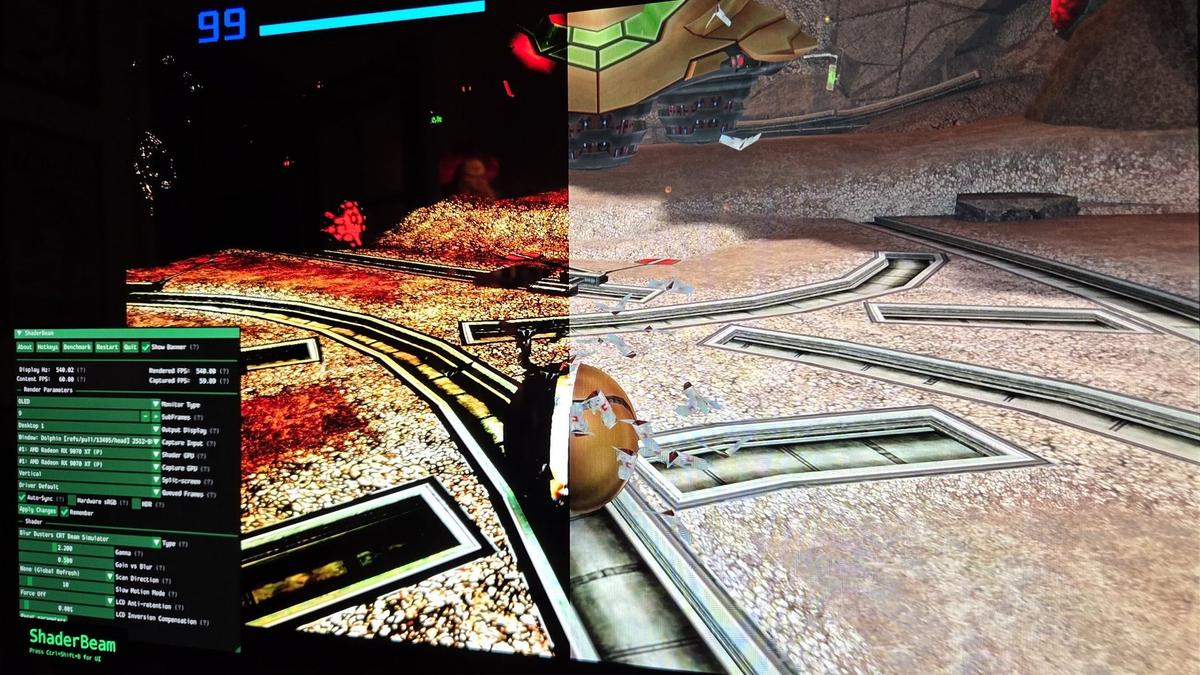
- Configure Custom Shader Pipelines: Utilize CRT simulation shaders like Megatron or CRT-Royale alongside software BFI shaders to insert black intervals directly at the graphics API level.
- Disable Variable Refresh Rates: Turn off G-Sync and FreeSync during BFI sessions. Variable refresh timing causes noticeable flicker and stroboscopic mismatch during fixed impulse emulation.
- Lock Frame Rates Rigidly: Frame drops during impulse simulations cause severe visual stutter. Lock frame pacing cleanly using low-overhead limiters like RivaTuner Statistics Server with reflex mode.
Overcoming Windows Display Pipeline and DWM Hurdles
While modern display hardware has the capability to replicate CRT motion, the desktop operating system remains a major technical obstacle. The Windows Desktop Window Manager (DWM) enforces compositing rules that often conflict with low-persistence, high-frequency frame strobing.
The primary hurdle lies in how Windows handles frame pacing, timing precision, and mixed refresh rate multi-monitor environments. When desktop compositing forces buffered presentation queues, micro-jitter disrupts the exact alignment required between the game tick rate and the physical strobe cycles of the monitor.
To bypass DWM interference and preserve cadence:
- Run all emulation tools and retro titles in dedicated exclusive fullscreen mode rather than borderless windowed modes.
- Disable Windows Auto HDR, as dynamic tone mapping can alter calibrated black frame luminance levels.
- Utilize modern presentation models such as Flip Model DXGI or Vulkan direct display extensions to bypass standard desktop compositing pipelines.
Developer Considerations: Designing Pixel-Art Games for Modern Displays
For game developers building 2D pixel-art platformers or retro-inspired shooters, accounting for modern display characteristics is essential. Relying entirely on player-side monitor hardware often leads to inconsistent presentation across diverse user setups.
To achieve deterministic sub-frame timing on modern PC platforms, graphics programmers should implement waitable swapchains using modern DirectX APIs. By creating the swapchain with the `DXGI_SWAP_CHAIN_FLAG_FRAME_LATENCY_WAITABLE_OBJECT` flag and acquiring the kernel handle via `IDXGISwapChain2::GetFrameLatencyWaitableObject`, engines can directly synchronize render threads with the display hardware refresh cycle. Calling `SetMaximumFrameLatency` with a value of 1 forces the render thread to block on the waitable object before processing input and rendering the next sub-frame.
This approach guarantees that software-driven black frame intervals or multi-cadence presentation ticks stay strictly aligned with the monitor VBLANK, avoiding the queued frame delays that cause DWM desynchronization. Combining waitable object swapchains with high-resolution timer queues allows an engine running at 240Hz or 480Hz to alternate rendered frames and blank frames with microsecond precision.
Engineers should also integrate internal presentation settings that support custom scanline shaders and optional software-based BFI switches directly within the game graphics menu. By offering an integrated CRT emulation suite that pairs shader masks with low-persistence sub-frame rendering, developers can ensure their art style preserves the kinetic motion clarity originally pioneered in the arcade and console classics of the 1990s.
At White Cube Studios, we translate technical architecture into shipping systems across our specialized development pillars: