Architecting Cloud Gaming Infrastructure: Store Integrations, Cloud Save Syncing, and RTX Cloud Rendering Optimization

Key Takeaways
- •1. Federated Identity and Multi-Store Library Syncing
- •Account Linking and Single Sign-On (SSO) Flow
- •Dynamic Ownership Verification
As game distribution platforms fragment and target hardware spans everything from high-end desktop rigs to low-powered mobile screens, developers and service providers face a massive challenge: how to deliver consistent, high-fidelity experiences without forcing players to buy multiple copies of the same game or spend hours managing local storage.
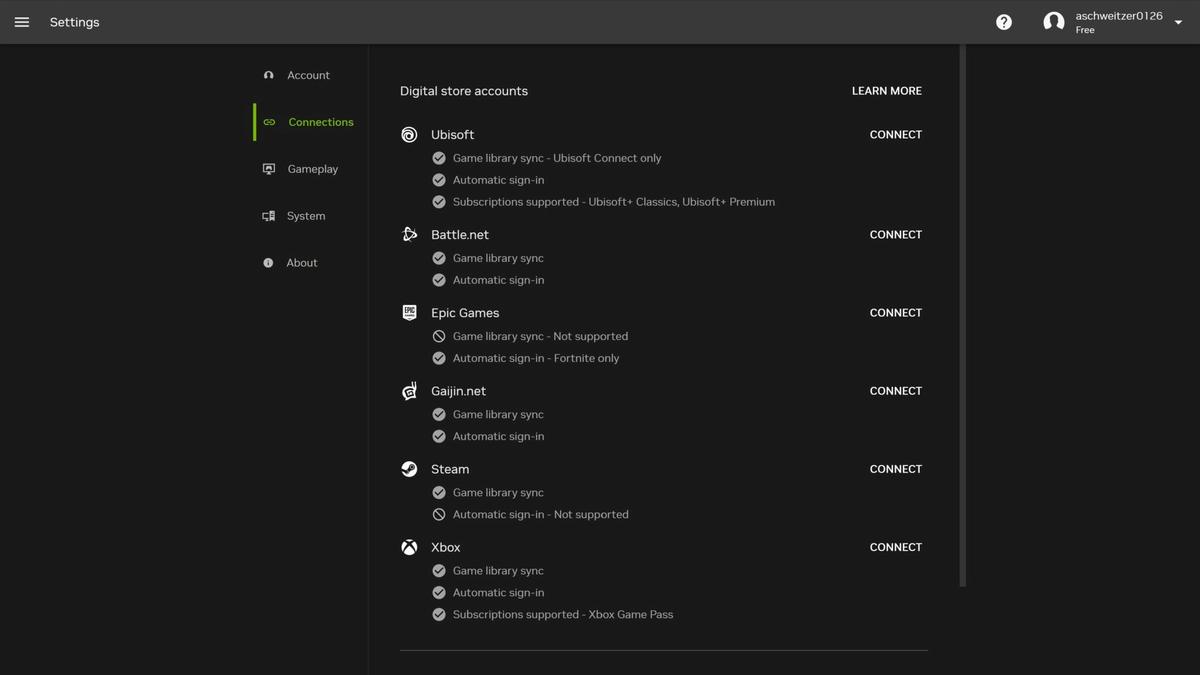
Cloud gaming services, most notably NVIDIA's GeForce NOW, solve this problem by decoupling the execution hardware from the display client. Rather than operating as a closed ecosystem, modern cloud gaming platforms function as an infrastructure layer. They bridge existing PC game storefronts—including Steam, Epic Games Store, Xbox, Ubisoft+, the EA app, and GOG—to stream owned titles directly to clients on PC, macOS, iOS, Android, and smart TVs.
This guide breaks down the engineering behind this cloud-streaming architecture, focusing on cross-platform single sign-on (SSO), cloud-save replication pipelines, virtualized storage orchestration, and RTX-accelerated cloud rendering optimization.
1. Federated Identity and Multi-Store Library Syncing
A primary engineering hurdle in open cloud-gaming models is verifying game ownership and managing library metadata across multiple third-party storefronts. Unlike closed cloud consoles, GeForce NOW relies on a federated identity model. It allows players to link their existing digital storefront accounts to retrieve ownership records dynamically.
Account Linking and Single Sign-On (SSO) Flow
Integrating external game stores requires establishing a secure, standard-based authentication bridge. Most PC game stores utilize protocols like OAuth 2.0 or OpenID Connect to authorize the cloud service to read the player's library metadata.
For instance, the integration of GOG single sign-on (SSO) and library syncing simplifies the user authentication loop. A typical SSO and sync pipeline operates under the following sequence:
1. Authentication Request: The player initiates account linking within the cloud gaming client. The client redirects the user to the storefront's authorization server.
2. User Consent: The user authenticates directly with the store credentials (e.g., GOG or Ubisoft credentials) and grants read-only permission for their library metadata.
3. Authorization Grant: The storefront's server issues an authorization code back to the cloud gaming gateway.
4. Token Exchange: The cloud gaming backend exchanges the code for access and refresh tokens, which are stored securely within the user's profile.
5. Metadata Syncing: Using these credentials, the cloud backend polls the storefront's library APIs to catalog the list of owned, supported games.
Dynamic Ownership Verification
When a user launches a game, the cloud orchestration layer spins up a virtualized game session. Before executing the game executable, the virtual machine (VM) must authenticate ownership with the respective launcher (e.g., Steam, Epic, Ubisoft Connect, or EA App). By passing authorization tokens directly into the VM, the system logs the user into the launcher automatically, bypasses manual credential entry, and prevents unauthorized game execution.
2. Cloud-Save Replication and State Synchronization
To provide a seamless cross-device experience where a player can start a session on a MacBook and pick up where they left off on an iPhone (running titles like the PC-only Dead as Disco or RPGs like Cyberpunk 2077 and The Witcher 3: Wild Hunt), the cloud infrastructure must orchestrate real-time cloud-save synchronization.
This sync relies on hooking into each storefront's cloud-save APIs and managing dynamic state directories.
The Cloud-Save Lifecycle
The state replication lifecycle must run reliably on session startup and teardown to prevent data loss or save synchronization conflicts:
- Session Initialization (Pre-launch Sync):
1. The session orchestrator provisions the VM.
2. The orchestrator invokes the storefront’s API to fetch the latest cloud save payload.
3. The payload is uncompressed and written to the game's designated save directory on the VM's ephemeral drive (e.g., `C:\Users\ContainerUser\Saved Games\`).
4. The game starts, loading the local save state immediately.
- Session Active:
1. During active play, the game writes saves locally to the VM's disk.
2. For select architectures, background processes can monitor file modifications in the save directory to prepare sync payloads ahead of session termination.
- Session Termination (Post-launch Sync):
1. The player exits the game, triggering the session teardown routine.
2. The sync daemon scans the save directory, detects modified or new save files, and packages them into a compressed archive.
3. The daemon uploads the archive to the storefront's cloud-save endpoints.
4. The orchestrator waits for a success response from the store API before de-provisioning the VM, guaranteeing that no progress is lost.
3. High-Performance Cloud Rendering: RTX 5080-Class Pipelines
Delivering up to 5K resolution at 120 frames per second requires massive compute capability and latency-optimized rendering pipelines. The Ultimate tier of GeForce NOW leverages virtualized GeForce RTX 5080-class GPUs to execute demanding graphics workloads. This compute power allows the cloud platform to run hardware-intensive features like real-time ray tracing, DLSS (Deep Learning Super Sampling), and NVIDIA Reflex.
Ray Tracing and DLSS Integration in Virtualized Environments
In a cloud environment, the rendering pipeline must not only calculate lighting but also encode the output video stream in real time. Ray tracing leverages dedicated RT Cores on the virtualized GPU to calculate physical light bounces, soft shadows, and global illumination.
To mitigate the performance impact of ray tracing at resolutions up to 5K, the virtualized GPUs employ DLSS:
- Deep Learning Super Sampling: Instead of rendering at native 5K, the engine renders at a lower internal resolution (e.g., 1440p) and uses AI tensor cores to upscale the frame to 5K. This reduces the shading load on the GPU.
- Frame Generation: By utilizing DLSS Frame Generation, the virtualized GPU inserts AI-generated frames between traditionally rendered frames, effectively doubling the frame rate from 60 FPS to 120 FPS without increasing the game's internal simulation rate.
System Latency Reduction with NVIDIA Reflex
Cloud streaming introduces network latency (round-trip time from player input to video display). To counteract this, NVIDIA Reflex is integrated directly into the cloud streaming stack:
- Reflex SDK Integration: Games that support NVIDIA Reflex communicate directly with the game loop to eliminate the GPU render queue. The CPU only passes frame data to the GPU when the GPU is ready to receive it, reducing internal system latency.
- Latency-Aligned Encoding: The video encoder is synchronized directly with the GPU's frame generation cycle. As soon as a frame is rendered, it is immediately encoded (using hardware NVENC) without sitting in a frame buffer, saving milliseconds of pipeline latency.
4. Virtualized Storage and Caching Strategies
One of the secondary benefits of cloud gaming demonstrated across modern platforms is the elimination of local storage management, download times, and patch updates. From an infrastructure perspective, this requires a robust storage architecture capable of delivering multi-gigabyte game files to virtual machines instantly.
Instead of downloading a game like Dragon Age: The Veilguard or Battlefield 6 every time a user requests a session, the host data centers utilize tiered caching and shared read-only storage pools:
1. Golden Image Storage: Every supported game is pre-installed, pre-patched, and saved as a read-only disk image (Golden Image) in high-throughput network-attached storage (NAS).
2. Ephemeral VM Drives: When a session is provisioned, the VM mounts the Golden Image as a read-only loop device. Any writes generated by the game (temp files, cache) are redirected to an ephemeral write-overlay layer on local NVMe drives.
3. Dynamic Caching: Highly popular games (like the newly added Citizen Sleeper or Super Meat Boy 3D) are cached directly on high-speed local storage within the server nodes, bypassing network storage bottlenecks entirely and reducing launch times to seconds.
5. Visual and Interactive Media Assets
To see these cloud-streaming integrations in action, check out the following showcase video explaining the service's game store integrations and device support:

(Note: Annual Performance and Ultimate memberships are available with special summer discounts, allowing developers and players alike to leverage high-performance RTX hardware in the cloud).

Through single sign-on, cloud-save replication, and RTX-accelerated rendering, cloud gaming infrastructures demonstrate how advanced systems engineering can bridge the gap between high-fidelity PC gaming and the convenience of multi-screen accessibility.
At White Cube Studios, we translate technical architecture into shipping systems across our specialized development pillars: